Configure token scopes
Choose exactly which data and operations an integration can access.
Organization administrators configure Core API tokens in Brella’s Admin Panel. A token identifies the integration; its scopes determine which resources, events, fields, and operations it can access.
Create a token and configure its scopes
The screenshots below use test organizations. Start with the resources and permissions your integration needs; you can add further scopes to the same token.
1. Open Organization tokens
In the Admin Panel, open your organization, select API, then choose Organization tokens. This is the tab for Core API tokens. The adjacent Personal API key (Legacy) tab belongs to the legacy API.
Select Create token.
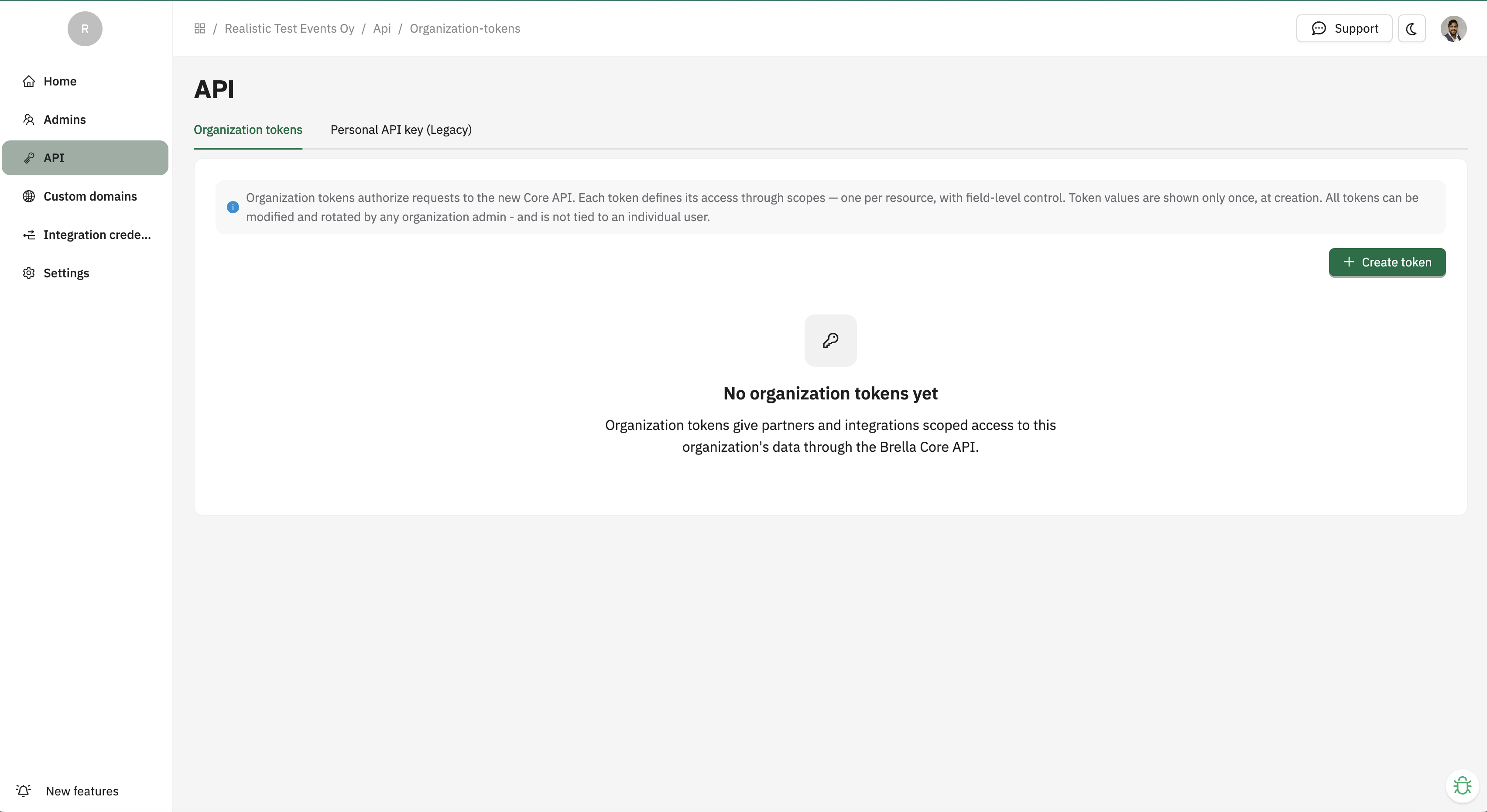 View full screenshot (opens in a new tab)
2. Create and save your token
- Name: use a name that identifies the integration, such as Sponsor reporting.
- Description: explain its purpose so other organization administrators know what it is used for.
- Expires: choose an expiry appropriate to the integration. Leaving this empty creates a token that does not expire; an expiry is recommended for partner access.
Select Create and securely save the token value. It is shown only when the token is created or rotated. Other organization administrators can manage the token and its scopes, but cannot retrieve the existing secret later.
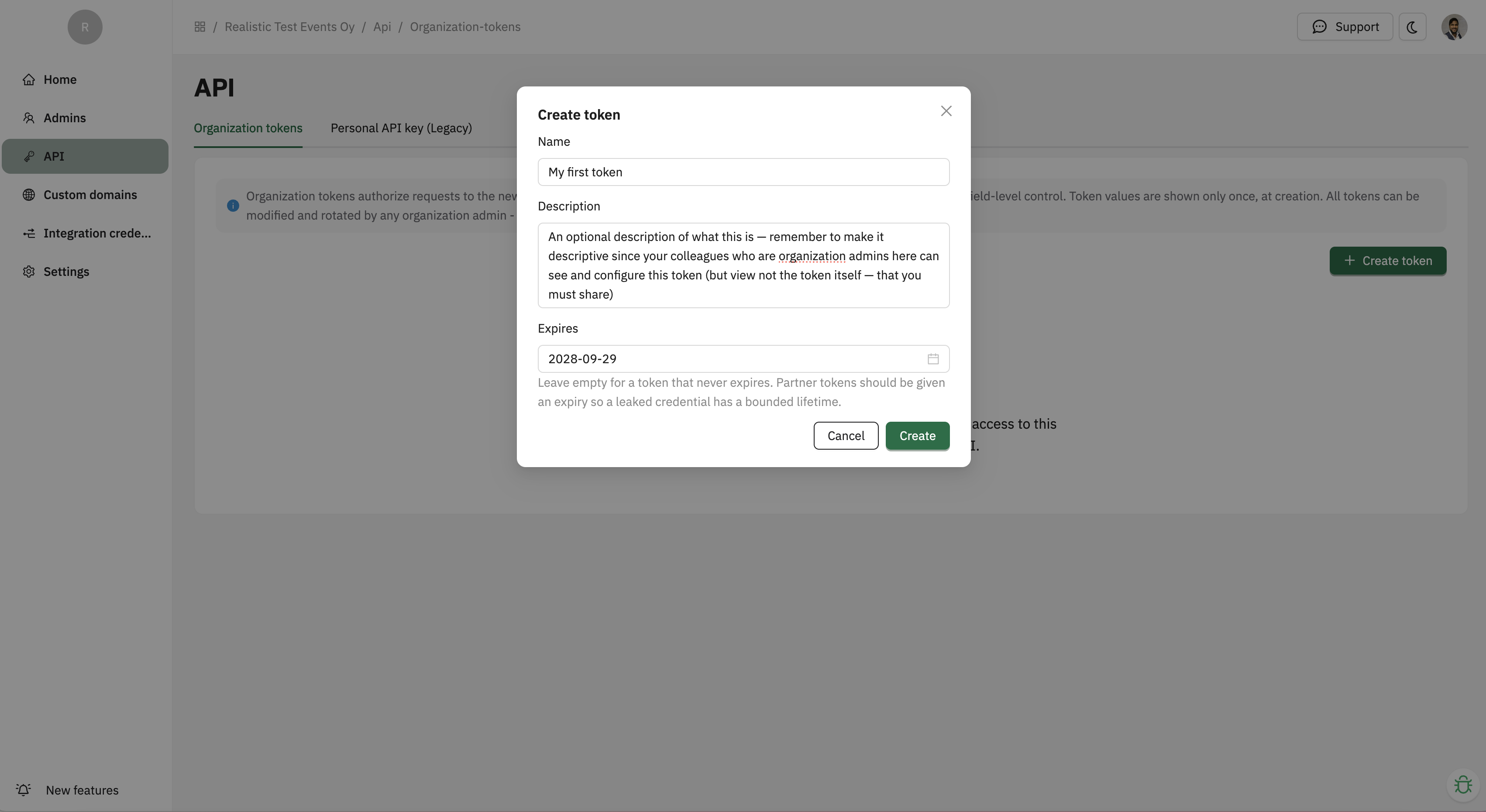 View full screenshot (opens in a new tab)
3. Add a scope
Open the token and select Add scope. The example below grants read access to sponsors.
- Give the scope a descriptive Name, such as Sponsor (Read Only). The name is a label; the settings below determine access.
- Choose Sponsor as the Primary resource. The primary resource cannot be changed after the scope is created.
- Under Permissions, select Read. Leave Write off for a read-only integration.
- Under Event access, choose Specific events when access is only needed for particular events, and select those events. All events, shown in the screenshot, allows access across the organization’s events. An empty event selection in the underlying scope means all organization events.
- Under Read configuration, select the Readable fields your integration needs, such as
name.idis always included. Configure query fields, row restrictions, and included associations as needed; the sections below explain each option. - Keep Enabled on, then select Add scope to save.
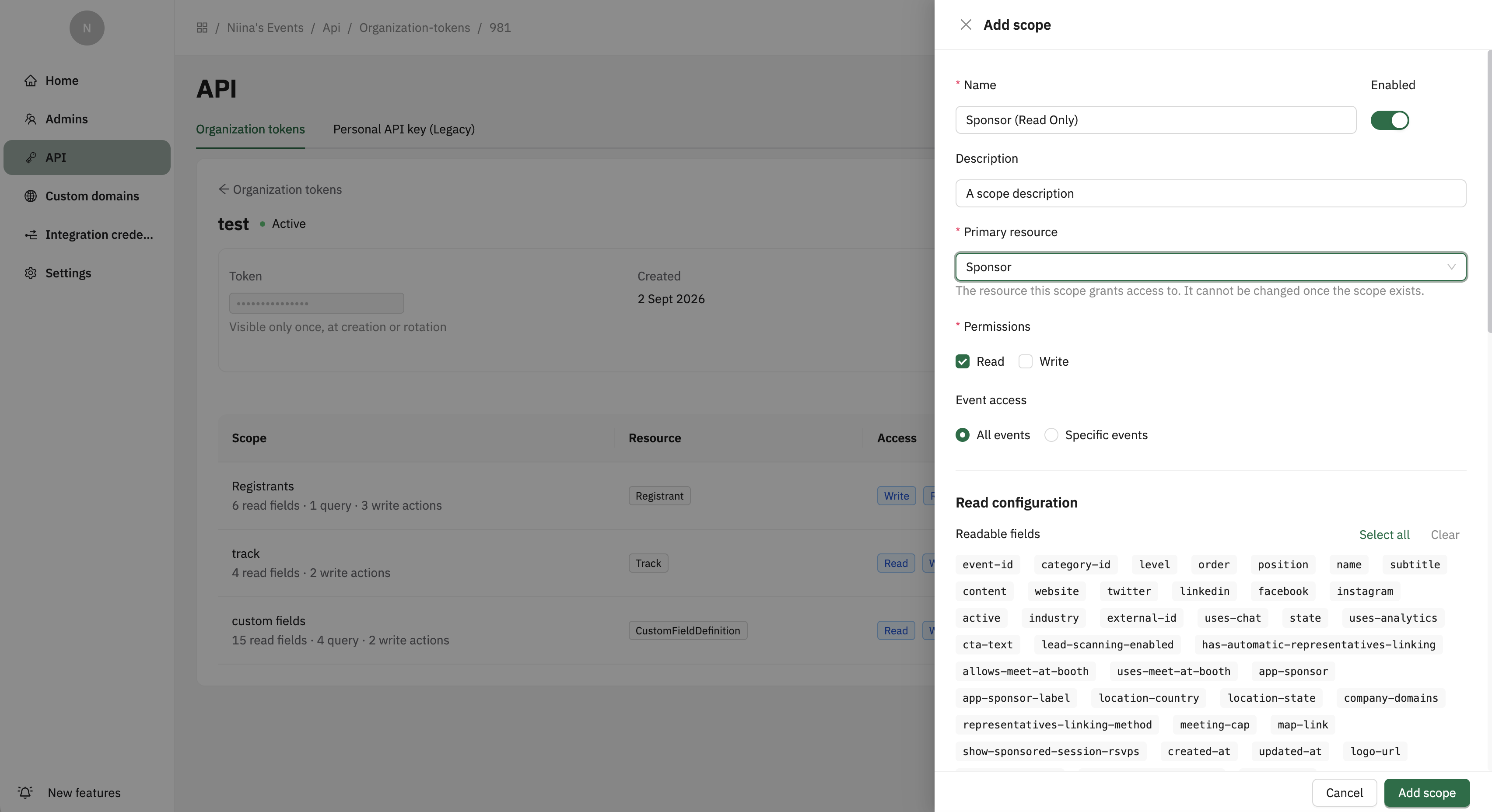 View full screenshot (opens in a new tab)
For the first-request quickstart, use a Registrant scope with Read access to your chosen event. Select external-id as a readable field to match its example response. The Sponsor scope above is a separate example.
For an integration that changes data, enable Write where supported and configure its write actions and fields. Selecting Write alone does not choose which actions or inputs are allowed.
You can now send the token using the headers in the authentication guide.
Manage the token
Deleting a token revokes all of its scopes. Rotating a token immediately invalidates the old token value while preserving its configuration. A token with an expiry time is rejected after that time.
Read configuration
| Admin Panel option | Effect |
|---|---|
| Readable fields | Attributes the API may return. id is always included. |
| Query fields | Filters the API caller is allowed to send. |
| Row restrictions | Server-enforced filters that the caller cannot remove or broaden. |
| Included associations | Related resources that may be exposed, optionally with a narrower field set. |
Selecting an association in the Admin Panel does not automatically place its full object in every response. It authorizes relationship linkage; the caller uses the dashed or aliased relationship name, such as ?include=created-by-registrant when the related object is needed.
Row restrictions
Row restrictions are the main way to give a partner access only to its own data. Depending on the resource, an administrator may restrict by:
- a field, such as sponsor
stateor eventevent_type; - an association, such as leads belonging to selected sponsors;
- primary record IDs, such as a fixed set of sponsor IDs; or
- a named rule, such as sponsor-owned meetings, RSVPs, sessions, or tracking data.
Restrictions always apply to collection reads, individual reads, updates, and deletes. Records outside the restriction behave as not found. Creates must also satisfy the restriction. A scope restricted to specific primary sponsor records cannot create new sponsors.
Sponsor-owned scanning questions use the named sponsor restriction for partner access. Sponsor categories have a separate scope; category deletion removes the category’s sponsors, so grant its delete action only when that operation is needed.
The underlying restriction shapes are:
[
  { "field": "state", "values": ["active"] },
  { "association": "sponsors", "values": [103705] },
  { "primary": true, "values": [103705, 103706] },
  { "restriction": "sponsor", "values": [103705] }
]
Only selectors advertised for that resource may be used. Values inside one restriction are alternatives, like SQL IN; multiple restriction objects are cumulative and must all match.
Write configuration
| Admin Panel option | Effect |
|---|---|
| Write actions | The allowed subset of create, update, and delete. Only actions supported by the resource can be selected. |
| Writable fields | Maps a request parameter to a writable resource field or write-only input. |
| Response fields | Attributes returned after successful POST and PATCH requests, independently of Readable fields. Stored as write_response_fields. |
An input that is not mapped in Writable fields is ignored. A successful status does not prove every submitted field changed. Missing Write permission or an allowed write action returns 403; a saved value can still be absent from the response when it is not selected under Response fields.
The API internally supports a request-key-to-field mapping. In the usual configuration, both names are the same, for example request parameter first_name maps to field first_name. If your administrator configures a different request parameter, use that configured parameter instead of the field name shown in this guide.
Required create inputs must be granted before create can be enabled. For example, meeting creation requires both requester_registrant_id and receiver_registrant_id; sponsor-ad creation requires sponsor_id.
For technical readers, the Admin Panel stores the selections in a structure like the following. The UI normally creates this configuration; it is shown here to make the enforcement model explicit.
{
  "token_scope": {
    "name": "Leads for selected sponsor",
    "description": "Read and maintain leads for one sponsor",
    "enabled": true,
    "primary_resource": "Lead",
    "permissions": ["read", "write"],
    "event_ids": [319986],
    "settings": {
      "read_fields": [
        "event_id",
        "sponsor_ids",
        "registrant_id",
        "created_by_registrant_id",
        "notes",
        "created_at",
        "updated_at"
      ],
      "read_query_fields": [
        "sponsor_id",
        "registrant_id",
        "created_from",
        "created_to"
      ],
      "read_restrictions": [
        { "association": "sponsors", "values": [103705] }
      ],
      "read_associations": [
        {
          "name": "registrant",
          "fields": ["external-id", "first-name", "last-name", "email"]
        },
        {
          "name": "created_by_registrant",
          "fields": ["external-id", "first-name", "last-name", "email"]
        }
      ],
      "write_actions": ["create", "update", "delete"],
      "write_fields": [
        { "param": "registrant_id", "field": "registrant_id" },
        { "param": "created_by_registrant_id", "field": "created_by_registrant_id" },
        { "param": "notes", "field": "notes" },
        { "param": "sponsor_id", "field": "sponsor_id" }
      ],
      "write_response_fields": [
        "event_id",
        "sponsor_ids",
        "registrant_id",
        "created_by_registrant_id",
        "notes",
        "created_at",
        "updated_at"
      ]
    }
  }
}
Names in read_fields, read_query_fields, write_fields, and write_response_fields are underscored internal names. Association response-field selections may be written with dashed names, as shown above. IDs in row restrictions can be numbers or strings because restriction values are scalar values; using numbers for database IDs is recommended.
Explore a response
Try Read a lead, then Update notes. The settings follow the Admin Panel’s terminology; the example focuses on the fields, associations, and Update action relevant to one lead.
See what your token allows
Alex visited a sponsor's booth. Explore what an integration can read about that lead, then try updating its notes.
Local example with fictional data. No API requests are sent. Each example starts from the same saved lead.
Try these combinations:
- Clear Readable fields to return only the lead’s ID/type and any allowed relationship linkage. Select an association in both the scope and the request to see its related record in
included. - Choose Update notes, then clear
notesfrom Writable fields. The input is ignored and the stored notes stay unchanged, even though the request returns200. - Allow
notesas a writable field but remove it from Response fields. The notes are saved without appearing in the write response. - Turn off Write or Update to get
403. Choose only the other event under Specific events to get404.
For related records, an empty field selection means all fields declared for that association; turn off the association to remove it. When registrant and created-by-registrant are both requested, the backend combines their selected profile fields for the returned event-registrant records. Keep this in mind when choosing which profile data to expose.
See Responses and errors for the status codes and Rate limits and retries for handling throttling.